
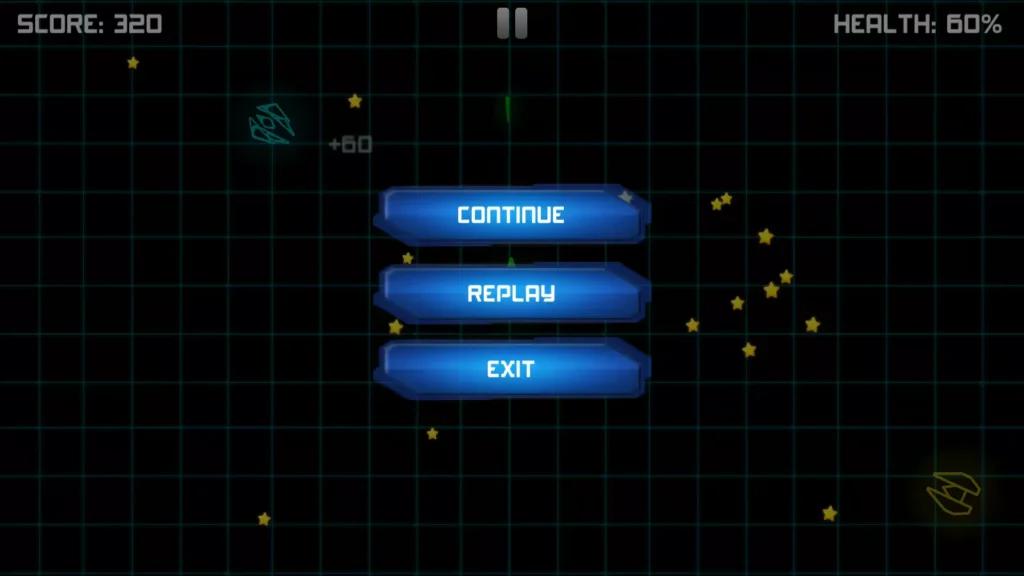
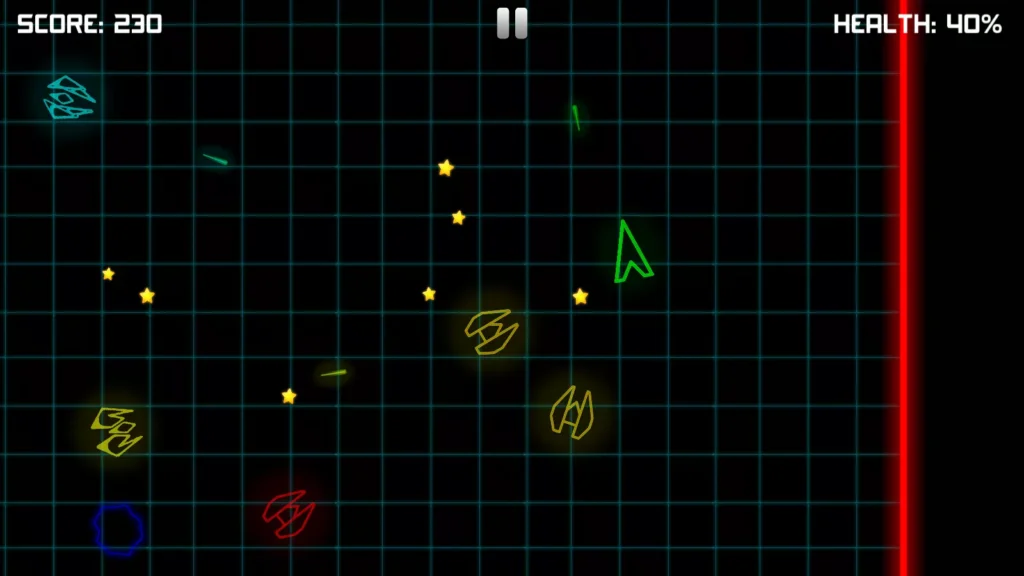
Neon Space Fighter is an endless 2D space-shooting game in which players control a powerful spacecraft, destroy enemy ships, avoid dangerous asteroids, collect yellow stars, and survive for as long as possible.
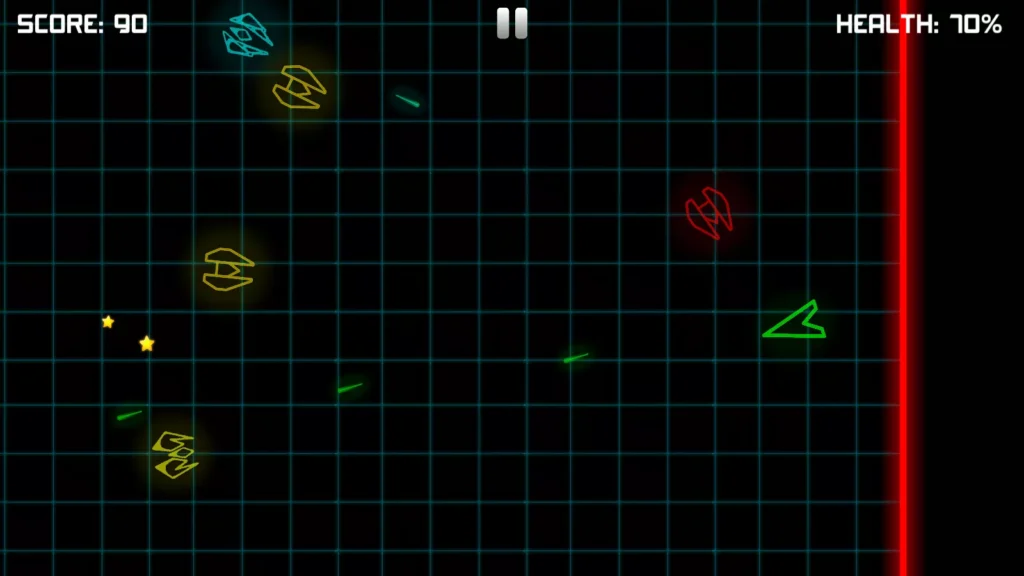
Enemy spacecraft continuously appear inside the battle arena. Some enemies fire bullets toward the player, while others behave like kamikaze ships and try to crash directly into the player’s spacecraft.
The game becomes more difficult as the player continues. Enemy ships grow stronger, more threats enter the arena, and players must improve their movement and shooting skills to achieve a higher score.
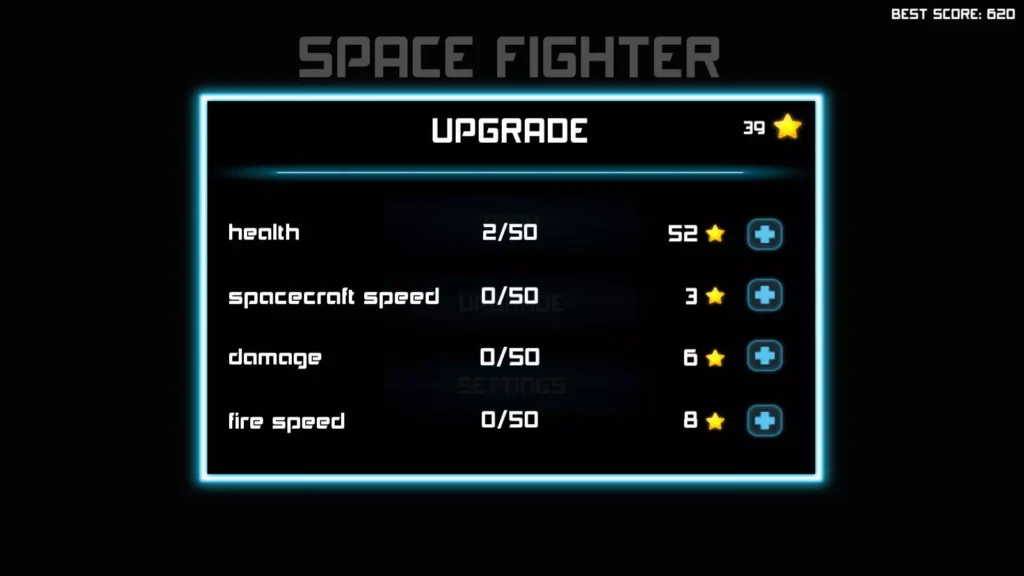
Collected yellow stars can be used to improve the player spacecraft’s speed, health, bullet damage, and shooting speed. This upgrade system gives players a reason to continue playing and build a stronger fighter.
The project includes neon-style graphics, a player spacecraft, four scripted enemy ships, randomly moving asteroids, science-fiction sound effects, user-interface elements, and simple 2D physics. It is designed as a complete Unity game template that can be customized and prepared for different platforms.
Game Overview
The main objective in Neon Space Fighter is to survive inside an endless space arena while destroying as many enemies as possible.
Players control a fighter spacecraft and shoot at incoming enemies. The arena does not have a traditional final level. Instead, the action continues while the enemies become more powerful and dangerous.
The player must balance several tasks:
- Control the spacecraft
- Aim and shoot at enemies
- Avoid enemy bullets
- Escape kamikaze spacecraft
- Watch for moving asteroids
- Collect yellow stars
- Protect the spacecraft’s health
- Improve important upgrades
- Achieve the highest possible score
The simple objective makes the game easy to understand, while the increasing difficulty makes it challenging to master.

How to Play Neon Space Fighter
Playing Neon Space Fighter is simple:
- Start the game and enter the space battle arena.
- Control the player spacecraft using the available movement controls.
- Aim toward enemy ships.
- Fire bullets to destroy incoming enemies.
- Avoid enemy bullets and direct collisions.
- Watch for asteroids moving through the arena.
- Collect yellow stars dropped by destroyed enemy ships.
- Use the collected stars to improve the spacecraft.
- Survive for as long as possible.
- Destroy more enemies and set a higher score.
Players must continue moving because remaining in one position can make them an easy target.
Endless Space-Shooting Gameplay
Neon Space Fighter uses an endless gameplay system.
There is no fixed final mission that immediately ends the game. Enemy forces continue appearing inside the arena while the player attempts to survive and increase the score.
An endless structure gives players a simple replay goal:
- Beat the previous score
- Survive longer
- Destroy more enemies
- Collect more stars
- Purchase more upgrades
- Build a stronger spacecraft
- Improve shooting accuracy
- Master enemy attack patterns
This gameplay style is suitable for short mobile sessions as well as longer high-score attempts.
Increasing Difficulty
The game becomes harder as the player progresses.
Enemy spacecraft can become more powerful over time, creating a steadily increasing challenge. Players who survive longer must deal with stronger opposition while continuing to avoid asteroids and enemy attacks.
Difficulty can be increased through:
- Stronger enemy health
- Higher enemy damage
- Faster enemy movement
- More enemy bullets
- More frequent enemy spawning
- Faster kamikaze attacks
- Additional asteroids
- Less space for safe movement
- More enemies appearing together
This progression prevents the endless gameplay from feeling the same during every part of a session.
Four Enemy Spaceships
The project includes four enemy spacecraft with their own scripts.
These enemies can be used to create different forms of pressure inside the battle arena. Two of the included enemy spacecraft can fire bullets, while other enemies can attempt to collide directly with the player.
Different enemy behaviour makes players change their strategy during gameplay.
Players may need to:
- Attack shooting enemies first
- Move away from kamikaze ships
- Avoid being surrounded
- Shoot enemies before they enter close range
- Use asteroids as temporary barriers
- Keep a safe movement route open
The existing enemies can also be duplicated or edited to create additional enemy types.
Shooting Enemy Spaceships
Some enemy spacecraft can attack the player by firing bullets.
These enemies can create danger from a distance and force the player to keep moving. The player must avoid the bullets while continuing to aim and return fire.
Shooting enemies can be customized by changing:
- Bullet speed
- Bullet damage
- Shooting delay
- Shooting distance
- Enemy health
- Enemy movement speed
- Attack range
- Fire rate
- Bullet graphics
- Shooting sounds
Different values can be used to create weak, standard, advanced, and boss-style enemies.
Kamikaze Enemy Attacks
Some enemy ships attempt to crash directly into the player’s spacecraft.
These kamikaze enemies create close-range danger. They can move toward the player and cause damage through direct collision.
Players must react quickly by:
- Moving away from the enemy
- Shooting before it reaches the player
- Changing direction
- Keeping distance from arena boundaries
- Avoiding multiple attackers at once
- Using faster spacecraft movement
Kamikaze behaviour can make the endless battle more intense because players cannot focus only on shooting enemies from a distance.
Randomly Moving Asteroids
The project includes an asteroid that moves randomly through the game area.
Asteroids add another threat to the arena. Players must watch the environment while fighting enemy spacecraft because an asteroid may suddenly move into their path.
Asteroids can be used as:
- Moving obstacles
- Collision hazards
- Environmental challenges
- Temporary barriers
- Destructible targets
- Score objects
- Sources of bonus items
Developers can duplicate the existing asteroid, change its size, modify its speed, or create different meteorite types.
Destroy Enemy Spacecraft
The player earns progress by shooting and destroying enemy ships.
Every successful attack can help increase the player’s score and may produce collectible yellow stars. Stronger enemies may require several hits, especially as the game becomes more difficult.
The shooting system can be customized through:
- Player bullet speed
- Bullet damage
- Shooting delay
- Number of bullets
- Bullet lifetime
- Bullet size
- Shooting direction
- Fire effects
- Impact effects
- Enemy explosion effects
Advanced developers can also add spread shots, lasers, rockets, charged attacks, and special weapons.
Collect Yellow Stars
Destroyed enemy spacecraft can drop yellow stars.
Players should collect these stars before they disappear or move outside the safe area. Stars act as an important reward because they can be used to improve the player spacecraft.
The star system encourages players to take calculated risks. A star may appear near an asteroid, enemy bullet, or incoming kamikaze ship. The player must decide whether the reward is worth the danger.
Yellow stars can also be connected with:
- High-score bonuses
- Daily rewards
- New spacecraft
- Weapon unlocks
- Cosmetic items
- Temporary power-ups
- Extra lives
- New battle arenas
Spaceship Upgrade System
The included star system allows players to upgrade four important spacecraft abilities:
- Spaceship speed
- Spaceship health
- Bullet damage
- Bullet shooting speed
These upgrades help the player survive longer and destroy stronger enemies.
Spaceship Speed Upgrade
The speed upgrade improves how quickly the spacecraft can move around the battle arena.
Greater speed can help players:
- Escape kamikaze enemies
- Avoid bullets
- Move around asteroids
- Collect stars
- Reposition before attacking
- Survive crowded situations
The upgrade should remain balanced so the spacecraft does not become difficult to control.
Spaceship Health Upgrade
The health upgrade allows the player to survive more damage.
Additional health can protect the spacecraft from:
- Enemy bullets
- Direct enemy collisions
- Asteroid impacts
- Stronger enemy attacks
- Boss damage
- Environmental hazards
Developers can also add visual health-bar changes or spacecraft damage effects.
Bullet Damage Upgrade
The bullet-damage upgrade increases the amount of damage caused by each player projectile.
Higher bullet damage can help players:
- Destroy enemies with fewer shots
- Defeat stronger enemy ships
- Handle groups of attackers
- Progress further into the game
- Increase the score more quickly
Different damage levels can also change the bullet graphics or impact effects.
Shooting Speed Upgrade
The shooting-speed upgrade reduces the delay between shots.
A faster fire rate can help the player attack more enemies within a short period. However, extremely fast shooting should be tested carefully to avoid performance issues or unbalanced gameplay.
This upgrade can improve:
- Damage per second
- Protection against kamikaze ships
- Enemy-clearing speed
- High-score potential
- Player satisfaction
High-Score Gameplay
The main long-term objective is to achieve the highest score possible.
Players can increase their score by destroying enemy spacecraft and surviving longer. The exact scoring values can be edited to create a balanced progression system.
Possible scoring rules include:
- Points for every enemy destroyed
- More points for stronger enemies
- Bonus points for consecutive kills
- Survival-time bonuses
- Asteroid-destruction rewards
- Star-collection bonuses
- No-damage bonuses
- Accuracy bonuses
- Combo multipliers
- Boss-kill bonuses
A saved best-score system can encourage players to return and attempt another run.
Key Features of Neon Space Fighter Unity Source Code
- Complete Unity space-shooter project
- Endless arcade gameplay
- 2D top-down space combat
- Player-controlled fighter spacecraft
- Four scripted enemy spacecraft
- Two enemy ships that can fire bullets
- Kamikaze enemy behaviour
- Enemy spawning inside the battle arena
- Increasing game difficulty
- Stronger enemies during progression
- Player shooting system
- Enemy bullet system
- Randomly moving asteroid
- Collision-based gameplay
- Yellow-star collection system
- Upgrade system
- Spaceship-speed upgrade
- Spaceship-health upgrade
- Bullet-damage upgrade
- Shooting-speed upgrade
- Score-based gameplay
- Neon glow graphics
- Science-fiction visual style
- Space battle environment
- User-interface bundle
- Menu screens
- HUD elements
- Included font
- Science-fiction sound effects
- Simple 2D physics
- Mobile optimization
- Android preparation
- iOS preparation
- Easy reskinning
- Editable Unity scripts
- Suitable for beginner developers
- Suitable for creating other 2D space shooters
Neon Glow Graphics
The project uses glowing neon-style graphics.
This visual style gives the game a bright science-fiction appearance while keeping the individual objects easy to see against the dark space background.
The graphics include elements for:
- Player spacecraft
- Enemy spacecraft
- Bullets
- Asteroids
- Yellow stars
- Buttons
- Menus
- HUD information
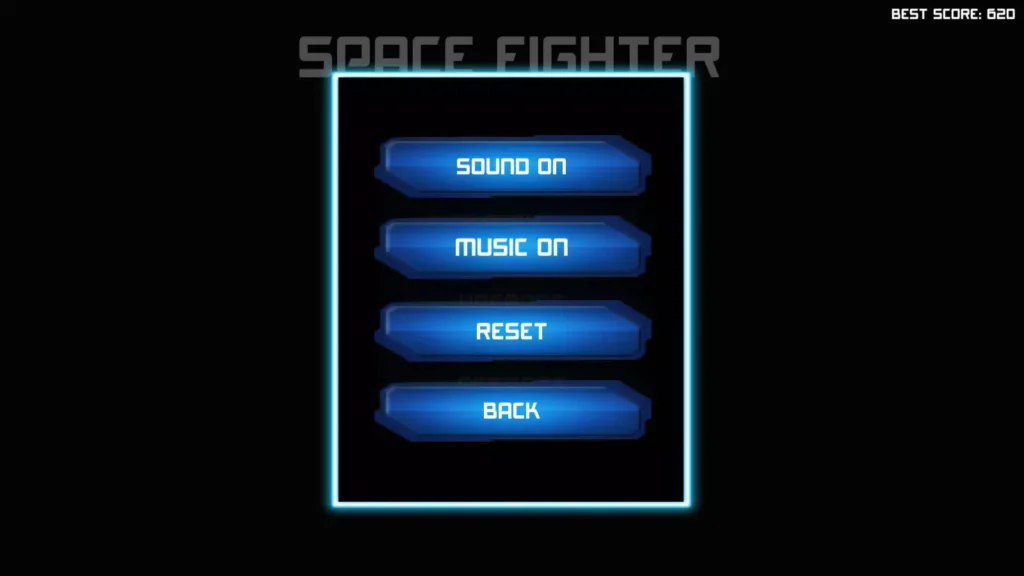
- Fonts
- Other interface elements
Developers can keep the neon design or replace it with a completely different visual theme.
User Interface Bundle
The included user-interface bundle contains important visual elements for the game.
The listing specifically identifies:
- Buttons
- Menu screens
- HUD elements
- Font assets
The HUD can be used to display information such as:
- Current score
- Best score
- Spaceship health
- Collected stars
- Upgrade values
- Pause button
- Current survival time
- Available power-ups
The menu graphics can be edited to match a new game name or theme.
Science-Fiction Sound Effects
The project includes several science-fiction sound effects.
The confirmed effects include sounds for:
- Bullet impact
- Enemy explosion
- Laser or “pew” shooting
- Button clicks
- Star collection
These sounds provide basic audio feedback for combat, menus, and rewards.
Developers can improve the audio experience by adding:
- Background space music
- Player engine sound
- Enemy engine sounds
- Warning alarms
- Low-health alerts
- Upgrade sounds
- Asteroid impacts
- Boss music
- Shield effects
- Game-over music
- High-score celebration sounds
Simple 2D Physics
Neon Space Fighter uses simple 2D physics for movement and collisions.
The physics system can manage interactions between:
- Player spacecraft
- Enemy spacecraft
- Player bullets
- Enemy bullets
- Asteroids
- Arena boundaries
- Collectible stars
A simple physics structure makes the project easier to understand and customize than a complex simulation.
Developers can edit the physics settings to change movement speed, collision behaviour, projectile motion, or object weight.
Mobile-Optimized Gameplay
The project is described as optimized for Android and iOS mobile devices.
The control system and interface can be prepared for touchscreen gameplay. Developers should still test the project on different screen sizes and real devices before publishing.
Mobile testing should cover:
- Touch responsiveness
- Control positioning
- Screen scaling
- Text size
- Safe-area support
- Device performance
- Battery usage
- Frame rate
- Memory usage
- Different aspect ratios
Additional optimization may be required after adding new graphics, effects, enemies, or advertisements.
Complete Unity Project Template
Neon Space Fighter is provided as a complete game project rather than only a small collection of visual assets.
The package contains the main gameplay foundation, enemies, player controller, shooting systems, asteroid behaviour, stars, upgrades, interface elements, graphics, and sounds.
This allows developers to start with a working space shooter instead of programming every system from the beginning.
Easy to Customize and Reskin
The project is designed to be easy to reskin.
Developers can replace or edit:
- Game title
- Application icon
- Splash screen
- Player spacecraft
- Enemy ships
- Asteroids
- Bullets
- Stars
- Space background
- Neon colours
- Menus
- HUD design
- Buttons
- Fonts
- Sound effects
- Background music
- Explosion effects
- Upgrade values
- Enemy statistics
- Scoring values
- Difficulty progression
A complete visual and gameplay update can create a more original final product.
Reskin and Game Theme Ideas
Galaxy Defender
Turn the project into a galaxy-defence game where the player protects planets from alien attackers.
Cyber Neon Fighter
Use dark cyberpunk backgrounds, glowing digital enemies, and electronic sound effects.
Alien Invasion Survivor
Replace enemy ships with different alien creatures and defend Earth from an endless invasion.
Asteroid Mining Adventure
Allow the player to destroy meteorites, collect valuable minerals, and upgrade a mining spacecraft.
Robot Space War
Replace the spacecraft with flying robots and create a mechanical battle arena.
Underwater Submarine Shooter
Change the space environment into an ocean and replace spaceships with submarines and sea creatures.
Dragon Sky Battle
Use flying dragons instead of spacecraft and replace bullets with fire attacks.
Military Jet Survival
Change the space arena into the sky and use fighter jets, missiles, and enemy aircraft.
Virus Cell Defender
Create a microscopic world where the player controls a defence cell and fights viruses.
Magical Arena Shooter
Replace spacecraft with magical characters and use spell projectiles, crystals, and monsters.
Retro Arcade Space Game
Use pixel-art graphics, classic sounds, and an old arcade interface.
Planet Rescue Mission
Give players objectives such as protecting colonies, escorting ships, or destroying invading forces.
Additional Enemy Ideas
The existing four enemy spacecraft can be expanded with new enemy types.
Possible additions include:
- Fast scout ship
- Heavy armoured ship
- Shielded enemy
- Sniper spacecraft
- Mine-dropping enemy
- Laser enemy
- Splitter ship
- Teleporting enemy
- Healing support ship
- Enemy carrier
- Mini-boss
- Large boss ship
Each enemy should have a clear visual design and attack pattern so players can understand the threat.
Weapon Ideas
The existing bullet system can be expanded with different weapons.
Possible weapons include:
- Standard laser
- Double shot
- Triple spread shot
- Rapid-fire cannon
- Plasma ball
- Homing missile
- Piercing laser
- Charged beam
- Electric attack
- Explosive rocket
- Rotating side guns
- Temporary super weapon
Weapons can be unlocked with stars, coins, achievements, or in-app purchases.
Power-Up Ideas
Temporary power-ups can make the endless gameplay more varied.
Possible power-ups include:
- Protective shield
- Rapid fire
- Double damage
- Slow motion
- Health recovery
- Magnet for yellow stars
- Multi-directional shooting
- Temporary invincibility
- Enemy freeze
- Screen-clearing bomb
- Score multiplier
- Extra spacecraft life
Power-ups can appear randomly after destroying enemies or asteroids.
Boss Battle Ideas
Boss battles can create major milestones during an endless run.
A boss could appear after:
- A fixed amount of time
- A certain number of kills
- Reaching a score target
- Completing an enemy wave
- Collecting enough stars
Bosses can use:
- Multiple weapons
- Rotating shields
- Missile attacks
- Laser beams
- Enemy spawning
- Charge attacks
- Changing movement patterns
- Several health phases
Defeating a boss could provide stars, upgrades, coins, or a large score bonus.
Wave-Based Mode
In addition to the endless mode, developers can add a wave-based game mode.
Each wave could contain:
- A fixed number of enemies
- A special enemy combination
- Increasing difficulty
- A short break between battles
- Upgrade opportunities
- A boss at the end
Wave-based gameplay can give players clear short-term objectives while keeping the core shooting system.
Mission Mode Ideas
A mission mode could give players specific objectives instead of only surviving.
Possible missions include:
- Destroy 20 enemies
- Survive for three minutes
- Collect 30 yellow stars
- Defeat a boss
- Complete the mission without damage
- Destroy only shooting enemies
- Protect another spacecraft
- Avoid all asteroids
- Reach a target score
- Use limited health
- Complete a mission with one weapon
Mission rewards could include stars, new spacecraft, or visual themes.
Advertisement Integration
The original listings do not state that AdMob, Unity LevelPlay, or another advertising SDK is included.
Developers can add a current advertising solution and connect it with suitable game events.
Interstitial Advertisements
Interstitial ads can be shown:
- After a completed game session
- After several failed attempts
- When returning to the main menu
- Before starting a special mission
- After a boss battle
Advertisements should not appear during active combat because they can interrupt the player.
Rewarded Video Advertisements
Rewarded ads can offer:
- One extra life
- Health recovery
- Bonus yellow stars
- Temporary shield
- Double score
- Free upgrade
- Continue after game over
- Starting power-up
Banner Advertisements
Banner ads can be placed on menus where they do not cover controls, the health display, score, stars, or combat area.
Monetization Options
After the required systems are added, the game can support several monetization methods.
Advertising Revenue
Use interstitial, rewarded, or banner advertisements at carefully selected points.
Remove Ads Purchase
Offer a one-time in-app purchase that removes regular advertisements.
Star Packages
Allow players to purchase additional yellow stars for upgrades.
Premium Spacecraft
Sell unique spacecraft with different appearances or starting statistics.
Weapon Packs
Offer special weapons such as lasers, rockets, spread shots, or plasma cannons.
Cosmetic Skins
Provide different colours, trails, bullet styles, explosions, and neon themes.
Continue Feature
Allow players to continue after losing by watching an advertisement or using a premium item.
Battle Pass
Add daily or weekly objectives that unlock stars, spacecraft skins, and weapon effects.
Technical Specifications
| Technical Detail | Information |
|---|---|
| Game Engine | Unity |
| Project Type | Complete 2D space-shooter template |
| Gameplay Style | Endless top-down arcade shooting |
| Main Character | Player-controlled spacecraft |
| Included Enemy Ships | Four |
| Shooting Enemies | Two confirmed enemy ships |
| Other Enemy Behaviour | Kamikaze collision attacks |
| Environmental Obstacle | Randomly moving asteroid |
| Collectible | Yellow stars |
| Included Upgrades | Speed, health, bullet damage and shooting speed |
| Graphics Style | Neon glow |
| Physics | Simple 2D physics |
| Included Audio | Science-fiction sound effects |
| Interface Assets | Buttons, menu screens, HUD and font |
| Mobile Optimization | Android and iOS |
| Unity Asset Store Version | 1.0.2 |
| Original Unity Version | Unity 2018.4.0 |
| Asset Store File Size | Approximately 823.1 KB |
| Latest Asset Store Release | September 2, 2020 |
| Newer Fab Compatibility | Unity 2022.x minimum |
| Newer Fab Render Pipeline | Built-in Render Pipeline |
| Advertising SDK | Not confirmed as included |
| In-App Purchases | Not confirmed as included |
The Unity Asset Store currently lists version 1.0.2, an 823.1 KB file, Unity 2018.4.0 as the original editor version, and September 2, 2020 as the latest Asset Store release. A newer Fab package lists Unity 2022.x as its minimum compatible version and identifies the Built-in Render Pipeline. The correct Unity version therefore depends on the exact package being downloaded.
Unity Version Information
The original Unity Asset Store package was created for Unity 2018.4.0.
Another marketplace version lists Unity 2017.4.1 or higher, while the publisher’s newer Fab package lists Unity 2022.x as the minimum compatible version.
Before opening the project:
- Check the documentation or version information included with your files.
- Make a backup of the complete project.
- Install the recommended Unity version through Unity Hub.
- Open the project and allow all scripts to compile.
- Review the Console for warnings or errors.
- Test movement, shooting, collisions, enemies, stars, and upgrades.
- Upgrade the editor only after confirming that the original project works.
Opening an older package in a much newer Unity version may cause:
- Script API warnings
- Input problems
- Physics differences
- Missing packages
- Material issues
- Font problems
- User-interface scaling changes
- Build errors
- Deprecated settings
- Scene or prefab upgrades
Always keep an untouched backup before changing the Unity version.
Supported Platforms
The project is optimized for:
- Android phones
- Android tablets
- iPhone
- iPad
Because it is built in Unity, it can potentially be adapted for:
- Windows
- macOS
- Linux
- WebGL
The publisher has offered browser and Android demonstrations for versions of this project. Final compatibility depends on the exact project version, plugins, input setup, Unity editor, and changes made by the developer.
What You Will Get
The project package is expected to include:
- Complete Neon Space Fighter Unity project
- Player spacecraft
- Player-control scripts
- Player shooting system
- Four scripted enemy spacecraft
- Two bullet-shooting enemy types
- Kamikaze enemy behaviour
- Enemy-spawning system
- Randomly moving asteroid
- Yellow-star collectible
- Star-based upgrade system
- Spaceship-speed upgrade
- Spaceship-health upgrade
- Bullet-damage upgrade
- Shooting-speed upgrade
- Score system
- Neon glow sprites
- Science-fiction sound effects
- Buttons
- Menu screens
- HUD elements
- Font asset
- Simple 2D physics
- Game scenes
- Editable C# scripts
The exact folder structure should be reviewed after importing the licensed package.
Who Can Use This Unity Project?
Neon Space Fighter can be useful for:
- Beginner Unity developers
- Students learning 2D game development
- Mobile-game creators
- Independent developers
- Freelancers creating games for clients
- Game-reskinning businesses
- Small game studios
- Arcade-game publishers
- Space-game developers
- Developers learning enemy artificial intelligence
- Developers studying shooting systems
- Developers learning endless-game progression
Basic Unity Editor knowledge is recommended. C# knowledge will be useful for creating new enemies, weapons, advertisements, purchases, missions, bosses, or advanced upgrades.
Why Use This Source Code?
Creating a complete endless shooter from the beginning requires work on player movement, weapons, enemies, spawning, collisions, scoring, upgrades, interfaces, sounds, and mobile controls.
This project already provides a foundation containing:
- A working player spacecraft
- Endless combat
- Four enemy ships
- Enemy shooting
- Kamikaze behaviour
- Random asteroid movement
- Collectible stars
- Four upgrade categories
- Neon graphics
- Menus and HUD elements
- Sound effects
- 2D physics
Developers can focus on creating original graphics, improving the gameplay, adding monetization, and preparing the project for publishing.
Suggested Features to Add
Consider adding the following features before release:
- Multiple player spacecraft
- More enemy types
- Boss battles
- Wave mode
- Mission mode
- Different weapons
- Temporary power-ups
- Daily rewards
- Achievement system
- Online leaderboards
- Local best scores
- Cloud saving
- Combo system
- Score multipliers
- Shield system
- Extra lives
- Spaceship skins
- Different arenas
- Planet backgrounds
- Improved explosions
- Camera shake
- Screen-flash effects
- Haptic feedback
- Sound settings
- Music settings
- Pause menu
- Tutorial
- Privacy-consent screen
- Localization
- Controller support
- Updated mobile input
- Modern advertising SDK
How to Open the Unity Project
- Download the project through the marketplace where it was purchased.
- Extract the downloaded files if required.
- Install Unity Hub.
- Install the Unity version recommended for your package.
- Open Unity Hub.
- Select Add Project from Disk.
- Choose the extracted project folder.
- Allow Unity to import and compile all files.
- Check the Console window for errors.
- Locate and open the main game scene.
- Enter Play Mode.
- Test movement, shooting, enemies, asteroids, stars, scoring, and upgrades.
The Codester version instructs users to open the gameScene scene from the main project folder. The scene name may be different in another version of the package.
How to Prepare the Game for Publishing
Before releasing a customized version:
- Change the game title
- Change the package identifier
- Replace the application icon
- Replace the splash screen
- Add your company or developer name
- Replace the player spacecraft
- Replace or redesign enemy ships
- Update the space background
- Improve menus and HUD graphics
- Add original music
- Test all sound effects
- Balance enemies and upgrades
- Add more gameplay content
- Save the best score
- Test on real mobile devices
- Update the Unity version when required
- Fix all Console errors
- Configure Android or iOS settings
- Add an advertising SDK if needed
- Configure in-app purchases if needed
- Add privacy consent
- Create a privacy policy
- Test different screen sizes
- Configure application signing
- Build a release version
- Create original screenshots
- Create a store feature graphic
- Write a unique store description
- Review all third-party licences
- Check current app-store policies
Recommended Reskinning Checklist
Changing only the game name and icon is not enough for a complete reskin.
For a more original result, update:
- Player spacecraft
- All enemy ships
- Asteroid graphics
- Bullets and weapons
- Yellow-star collectible
- Space background
- Neon colour palette
- Menu screens
- HUD design
- Buttons
- Fonts
- Sound effects
- Background music
- Explosion effects
- Movement effects
- Difficulty progression
- Upgrade prices
- Enemy statistics
- Scoring system
- Store screenshots
- Promotional graphics
Adding new enemies, weapons, bosses, and arenas can make the final game more different from the original project.
Important Notes
- The project uses endless gameplay rather than a fixed number of levels.
- Four enemy spacecraft are included.
- Two enemy ships are confirmed to fire bullets.
- Other enemies can use kamikaze collision behaviour.
- The project includes a randomly moving asteroid.
- Yellow stars are used for spacecraft upgrades.
- The four confirmed upgrades are speed, health, bullet damage, and shooting speed.
- The original Asset Store package lists Unity 2018.4.0.
- A newer Fab package lists Unity 2022.x compatibility.
- Check the exact Unity version included with your downloaded package.
- Back up the project before upgrading Unity.
- Advertising is not confirmed as integrated.
- In-app purchases are not confirmed as integrated.
- Add and configure your own monetization systems when required.
- Test the game on real mobile devices.
- Replace original branding and store graphics before release.
- Review the licence of every included asset.
- Current app-store requirements may differ from those used when the project was released.
- App-store approval is not guaranteed.
- Use the project according to the applicable marketplace licence.
Frequently Asked Questions
What is Neon Space Fighter?
Neon Space Fighter is an endless 2D space-shooting game in which players destroy enemy ships, avoid asteroids and enemy attacks, collect yellow stars, and upgrade their spacecraft.
Is this a complete Unity project?
Yes. The publisher describes it as a complete and fully functional game template.
Is the game level-based?
No. The main gameplay is endless. Players continue fighting while the enemies become stronger.
How many enemy ships are included?
The project includes four enemy spacecraft with scripts.
Can I publish it on Android?
Yes, it can be prepared for Android. An older project may require updates to Unity, the Android SDK, target API level, build tools, and application signing.
Can I publish it on iOS?
Yes. You will need a compatible Unity version, Xcode, an Apple Developer account, signing certificates, and current privacy configuration.
Download Neon Space Fighter Unity Source Code
Create your own endless space-shooting game with the Neon Space Fighter Unity source code.
Control a neon spacecraft, destroy four types of enemy ships, avoid bullets and kamikaze attacks, escape moving asteroids, collect yellow stars, and upgrade the spacecraft’s speed, health, bullet damage, and shooting speed.
Customize the graphics, create new enemies, add powerful weapons, introduce boss battles, integrate monetization, and prepare your own version for mobile or other Unity-supported platforms.
Download Neon Space Fighter Unity source code and start creating your customized 2D space battle game today.